The purpose of following the OAuth2 flow is to help you retrieve an authorization code and exchange it for an access_token.
Complete details of the specification are available in RFC 6749 section 4.1.
We strongly suggest using a standards-compliant client library to perform the next steps, using the configuration values provided by DailyPay.
Construct the request url using the template below, replacing the
{scope},{client_id}, and{redirect_uri}parameters with the configuration values accordingly.Additionally, generate a
stateparameter for the specific request, and a code challenge and verifier (used in a later step) for Proof Key Code Exchange.Make sure to url-encode each parameter e.g.
user:read_writebecomesuser%3aread_write
https://auth.dailypay.com/oauth2/auth
    ?response_type=code
    &scope={scope}
    &client_id={client_id}
    &redirect_uri={redirect_uri}
    &state={state}
    &code_challenge={code_challenge}
&code_challenge_method=S256 https://auth.dailypay.com/oauth2/auth
?response_type=code
&scope=user%3aread_write%20openid
&client_id=your-client-id
&redirect_uri=https%3A%2F%2Fexample.com%2Fcallback
&state=9876543fghijklm
&code_challenge=hKpKupTM391pE10xfQiorMxXarRKAHRhTfH_xkGf7U4
&code_challenge_method=S256The user will be prompted to log in or create a new DailyPay account and will be prompted to allow your application to act on their behalf.
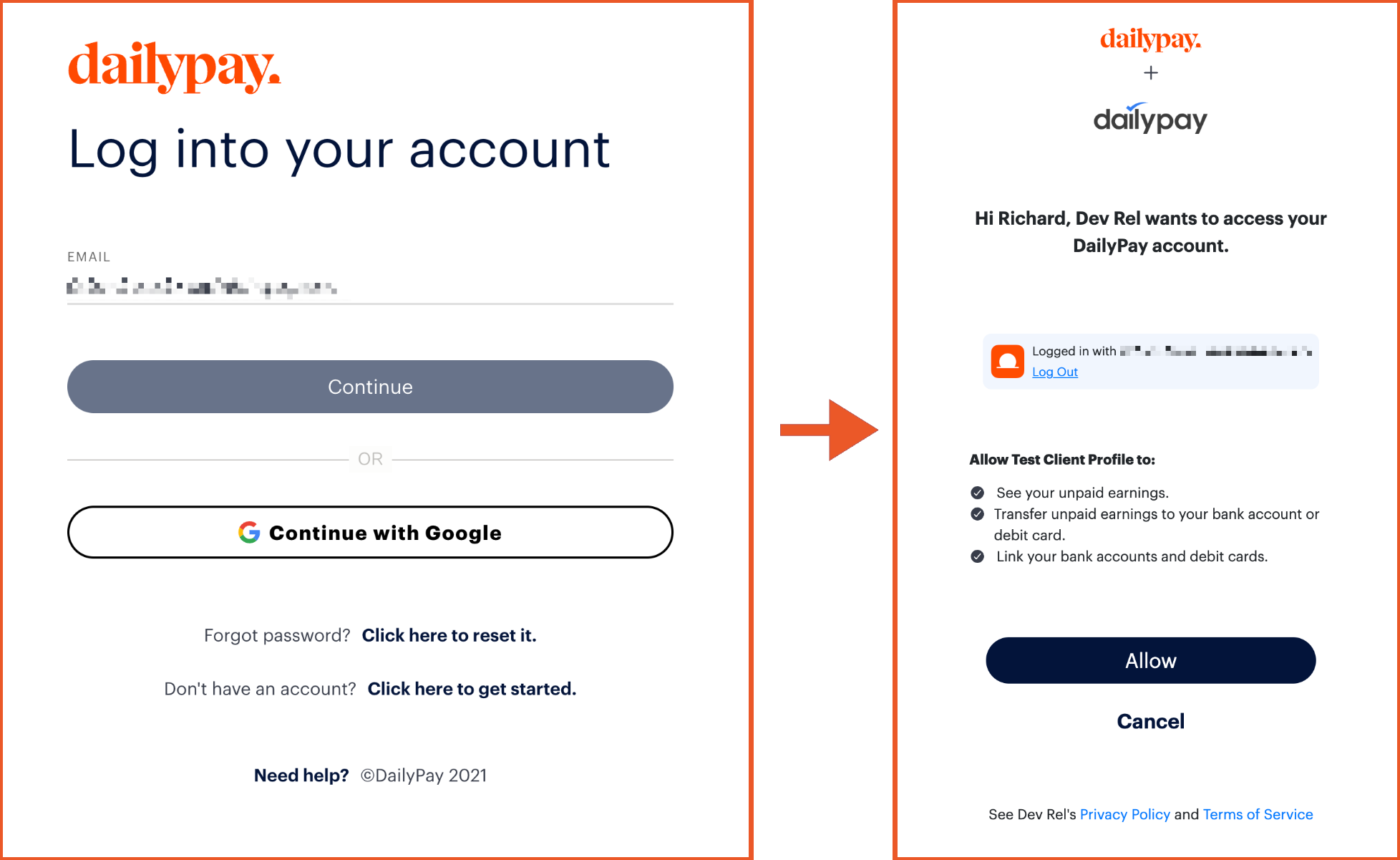
Users will be redirected in the open tab to your callback url with a code query parameter, or an error and error_description if the user did not consent to your application's request or otherwise encountered an error. You will also be returned the state parameter.
Send the following parameters www-form-encoded in the request body to the token endpoint:
| Environment | Token Endpoint |
|---|---|
| Production | https://auth.dailypay.com/oauth2/token |
| UAT | https://auth.uat.dailypay.com/oauth2/token |
The OAuth2 grant type
An authorization code received through user authorization flow
The url redirected to after the authorization flow was completed by current user.
A value used by the client to maintain state between the request and callback. This is used to prevent CSRF attacks. See https://www.rfc-editor.org/rfc/rfc6749#section-10.12 for more detail.
A PKCE verifier matching the challenge submitted during the authorization code request.
The client id of the application requesting the token.
The client secret of the application requesting the token, if available.
- Production environmenthttps://auth.dailypay.com/oauth2/token
- Development environmenthttps://auth.uat.dailypay.com/oauth2/token
- JavaScript
- Go
- C#
- Java
- Python
- Ruby
- cURL
const formData = {
  grant_type: 'authorization_code',
  code: '50BTIf2h7Wtg3DAk7ytpG5ML_PsNjfQA4M7iupH_3jw',
  redirect_uri: 'https://example.com/callback',
  state: 'xyzABC123',
  code_verifier: 'dBjftJeZ4CVP-mB92K27uhbUJU1p1r_wW1gFWFOEjXk',
  client_id: 'your_client_id',
  client_secret: 'your_client_secret'
};

const resp = await fetch(
  `https://auth.dailypay.com/oauth2/token`,
  {
    method: 'POST',
    headers: {
      'Content-Type': 'application/x-www-form-urlencoded'
    },
    body: new URLSearchParams(formData).toString()
  }
);

const data = await resp.text();
console.log(data);
The resulting access token can be used to make requests to the DailyPay REST API:
{
  "access_token": "dpo_38347Ae178B4a16C7e42F292c6912E7710c8",
  "refresh_token": "dpo_38347Ae178B4a16C7e42F292c6912E7710c9",
  "token_type": "bearer",
  "scope": "user:read_write",
  "id_token": "eyJhbGciOiJSUzI1NiIsInR5cCI6IkpXVCJ9.eyJzdWIiOiIxMjM0NTY3ODkwIiwibmFtZSI6IkpvaG4gRG9lIiwiaWF0IjoxNTE2MjM5MDIyfQ.4FjJ3eZJYJj7J9Jf",
  "expires_in": 3600
}
The authorization code, access token, and refresh tokens can vary in size but will typically remain under 4096 bytes.